> ## Documentation Index
> Fetch the complete documentation index at: https://docs.teamsbutactuallygood.dev/llms.txt
> Use this file to discover all available pages before exploring further.
# Information
Be sure to have followed the [dev setup](/dev-setup) before starting to dev on TBAG
## File Structure
Here you can have a good look on the important folder and what they contain
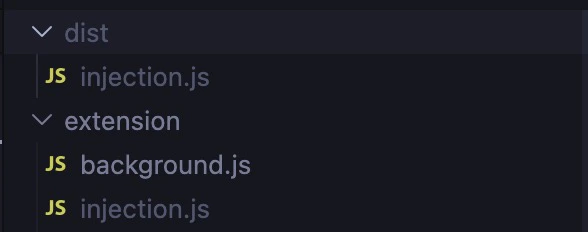
all the files related to the extension itself, as well as the injection.js (won't show if not build for the first time)
the safari extension xcode project
this is where the dev.ts (for the watch) and the generate all files are located, more could be added along the way
all Teams but (actually) good files
here reside all the official plugins
here reside all your custom plugin / unofficial ones, keep in mind that ones added like that might not work when Teams updates
here reside all the themes
all the files related to tauri, no need to touch them
## Commands
There's different commands you can run with bun that will, for example: build the extension / launch the app or watch (like nodemon) to help you dev on the extension easier
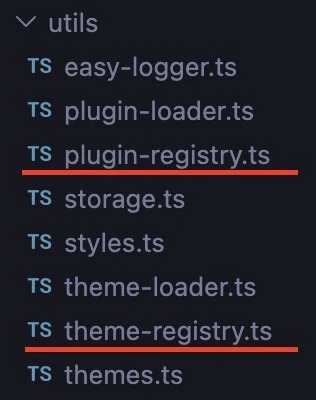
Generating `plugin-registry` and `theme-registry` is very important. If your plugin(s) / theme(s) are not in one of those files, TBAG won't load them and if those 2 files don't exist, TBAG wont launch itself either. To generate them you must run this command (automatically done if running other build commands, so don't worry to much about it)
 ```bash theme={null}
bun run generate
```
This command is like a `nodemon` but made for this projet, when a change is detected, it'll build the new `injection.js` file, make the extension reload itself (to take in count the new injection.js file) and if enable on the extension, reload the page
More info about how to use the extension in the [extension page](/dev-extension)
```bash theme={null}
bun run watch
```
Used for Tauri related commands
```bash theme={null}
bun run tauri
```
Used to build the `injection.js` file, that file contains the whole code for Teams but (actually) good, without it, there's no Teams but (actually) good, that command will create that file and put it inside the `dist` and `extension` folder to be used by the Tauri app and the extension
```bash theme={null}
bun run generate
```
This command is like a `nodemon` but made for this projet, when a change is detected, it'll build the new `injection.js` file, make the extension reload itself (to take in count the new injection.js file) and if enable on the extension, reload the page
More info about how to use the extension in the [extension page](/dev-extension)
```bash theme={null}
bun run watch
```
Used for Tauri related commands
```bash theme={null}
bun run tauri
```
Used to build the `injection.js` file, that file contains the whole code for Teams but (actually) good, without it, there's no Teams but (actually) good, that command will create that file and put it inside the `dist` and `extension` folder to be used by the Tauri app and the extension
 ```bash theme={null}
bun run build
```
Zip the extension for Chrome
```bash theme={null}
bun run build:ext
```
Same thing as build, but will also make the manifest.json compatible with firefox (needed because chrome manifest is not the same as firefox's manifest)
```bash theme={null}
bun run build:firefox
```
Zip the extension for Firefox
```bash theme={null}
bun run build:ext:firefox
```
Used on the extension and update the manifest.json
```bash theme={null}
bun run build:safari
```
Update the safari-extension project
```bash theme={null}
bun run build:ext:safari
```
Will generate the plugins and themes files, as well as generating the injection.js itself, this is the command that will actually do that job
```bash theme={null}
bun run build:base
```
Build the Tauri app in dev mode, includes the build of injection.js
```bash theme={null}
bun run dev
```
Build ONLY Tauri in dev mode
```bash theme={null}
bun run tauri:dev
```
Build Tauri in release mode
```bash theme={null}
bun run tauri:release
```
Build the Tauri app in releases mode, includes the build of injection.js
```bash theme={null}
bun run release
```
```bash theme={null}
bun run build
```
Zip the extension for Chrome
```bash theme={null}
bun run build:ext
```
Same thing as build, but will also make the manifest.json compatible with firefox (needed because chrome manifest is not the same as firefox's manifest)
```bash theme={null}
bun run build:firefox
```
Zip the extension for Firefox
```bash theme={null}
bun run build:ext:firefox
```
Used on the extension and update the manifest.json
```bash theme={null}
bun run build:safari
```
Update the safari-extension project
```bash theme={null}
bun run build:ext:safari
```
Will generate the plugins and themes files, as well as generating the injection.js itself, this is the command that will actually do that job
```bash theme={null}
bun run build:base
```
Build the Tauri app in dev mode, includes the build of injection.js
```bash theme={null}
bun run dev
```
Build ONLY Tauri in dev mode
```bash theme={null}
bun run tauri:dev
```
Build Tauri in release mode
```bash theme={null}
bun run tauri:release
```
Build the Tauri app in releases mode, includes the build of injection.js
```bash theme={null}
bun run release
```